Programs & seasons
The rounds that schedule your applications, windowed so treatments never slip.
Chemical tracking · Pro
If you apply pesticides, herbicides, or fertilizers commercially, you almost certainly have a legal obligation to keep application records. This is one place to keep them: a product catalog, a dose calculator, permanent snapshot records, and PDF exports you can hand to a state inspector. Available on the Pro and Scale plans.
The workflow
Four steps, and every one feeds the next. Set the catalog up once and every dose calculation and every legal record after that starts from correct numbers.
1 · Catalog
EPA registration number, active ingredient, signal word, restricted-use flag, re-entry interval, and default label, mix, and carrier rates (per product).
2 · Calculate
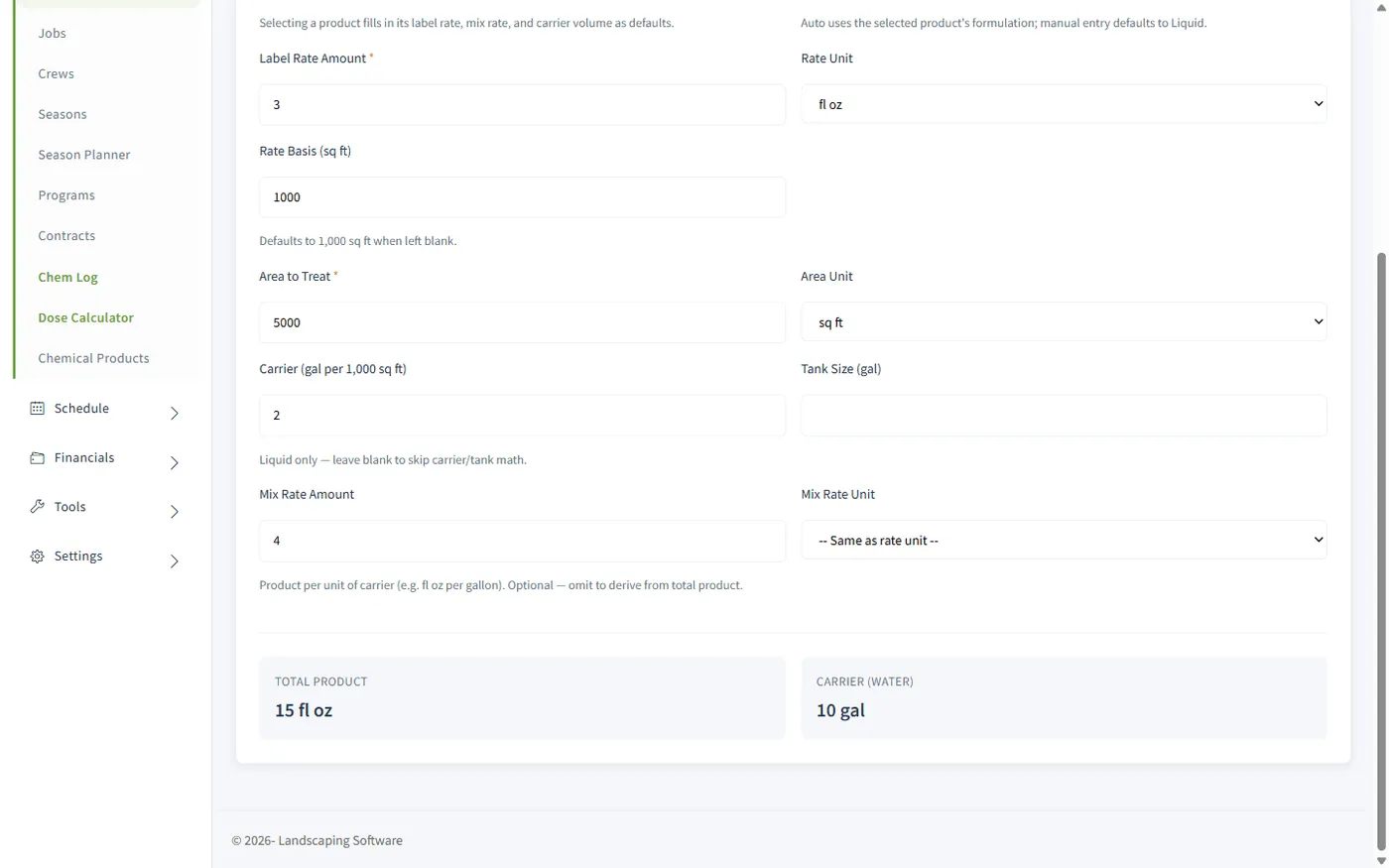
Pick the product, enter the area. Total product, water volume, tank fills, and product per tank come back with every unit conversion handled.
3 · Log
Who applied what, where, when, at what rate, in what weather, with the product and site details frozen into the record at save.
4 · Export
A signed single-application record sheet, or a summary of the whole filtered register, generated on demand, any time.
Dose calculator
"1.5 fl oz per 1,000 sq ft, sprayed at 2 gallons per thousand, on a 15,000 sq ft property, with a 25-gallon tank." The calculator turns that sentence into the four numbers your applicator actually needs: total product, total water, tank fills, and product per tank.
Unit conversions are handled for you: fluid ounces roll up to gallons, dry ounces to pounds, acres to square feet, and liquid and granular formulations each get the right treatment. It even refuses to convert across unit families, so a mixed-up label entry gets caught as an error instead of a misapplication.
The same calculator is built into the log form: work out the dose, click Apply to log, and the computed totals copy straight into the record.
The calculator does arithmetic from the numbers you give it, so always verify against the product label, which is the legal document.
Snapshot records
A legal record has to say what was true on the day of application, not what your catalog says today. So when a log is saved, the product’s name, EPA reg number, active ingredient, and restricted-use status, plus the job site’s address, are copied into the record and frozen. Rename the product next year; the 2026 logs don’t change.
Logs are never deleted. A record entered in error is voided with a required reason, stays in the register marked VOIDED, and can’t be edited after. Your audit trail stays complete, which is exactly what you want it to look like when someone official is reading it.
RUP products require an applicator license number before the log will save.
The register
The register is the searchable list of every application your company has recorded. Filter by date range, product, applicator, or customer, and the filtered view is bookmarkable and shareable. Every row shows the frozen record: date, product (with a red RUP badge where it applies), EPA reg number, site, applicator and license, area, rate, and total used.
Grid search, sort, and Excel/CSV export are built in. And because logs can be started from the visit itself, pre-filled with the customer, site, date, measured area, and the visit’s weather snapshot, the record gets written the day the work happens, not reconstructed a week later.
Straight talk
Record-keeping requirements vary by state, and sometimes by product and license type. This module gives you organized, consistent, tamper-resistant records and exports built for inspection, but it does not, by itself, make you compliant, and we won’t pretend otherwise. You’re responsible for knowing the rules that apply to your business; when in doubt, check with your state’s department of agriculture or licensing authority.
Works together
The rounds that schedule your applications, windowed so treatments never slip.
Visit completion in the field, with the measured area and weather ready for the log.
Application visits ride the same routes and calendars as everything else.
The fert book those applications belong to, renewed year over year.
Questions
Each product stores its EPA registration number, active ingredient, signal word, restricted-use (RUP) flag, re-entry interval, and default label, mix, and carrier rates. You enter the catalog once, carefully, and those details flow into every dose calculation and every log that uses the product.
Pick a product (its rates pre-fill) or enter the label values by hand, then enter the area to treat: square feet, thousands of square feet, or acres. It computes total product, water (carrier) volume, tank counts, and product per full tank, with all the unit conversions handled: fluid ounces to gallons, acres to square feet, dry ounces to pounds. Liquid and granular formulations are both supported.
When you save a log, the product’s name, EPA reg number, active ingredient, RUP status, and the job site’s address are copied into the record and frozen. Renaming a product or editing a site later never changes what an existing log says. Logs are never deleted, either: an erroneous record is voided with a required reason and stays in the register marked VOIDED, so the audit trail stays complete.
If a product is flagged RUP in your catalog, the log form requires an applicator license number before it will save (a supervising applicator’s number is acceptable). RUP products carry a red badge in the register.
Yes, that’s the fastest path. On a job’s visits, a Chem Log button opens the log form pre-filled with the customer, job site, visit date, measured area, and the visit’s weather snapshot. There’s also a one-click "Use current weather" button for same-day logging.
Two PDFs, generated on demand. The Record PDF is a single-application record sheet: product, site, applicator, rates, weather, notes, and a signature line. The PDF summary prints the whole filtered register as a table: every application in a date range, by product, applicator, or customer.
No software can promise that, and we won’t. Record-keeping requirements vary by state, product, and license type. What the module gives you is organized, consistent, tamper-resistant records and exports built for inspection, but you remain responsible for knowing the rules that apply to your business.
Chemical tracking (the catalog, dose calculator, application logs, and register) is available on the Pro and Scale plans.
14-day free trial · No credit card required