Scheduling & routing
The stop order you saved in the office is the order crews see in the truck.
Crew mobile app
Your crews get their whole day on a phone: their stops, their route, the work to do. They mark visits complete on site, and the office sees progress without a single 'are you done yet' call.
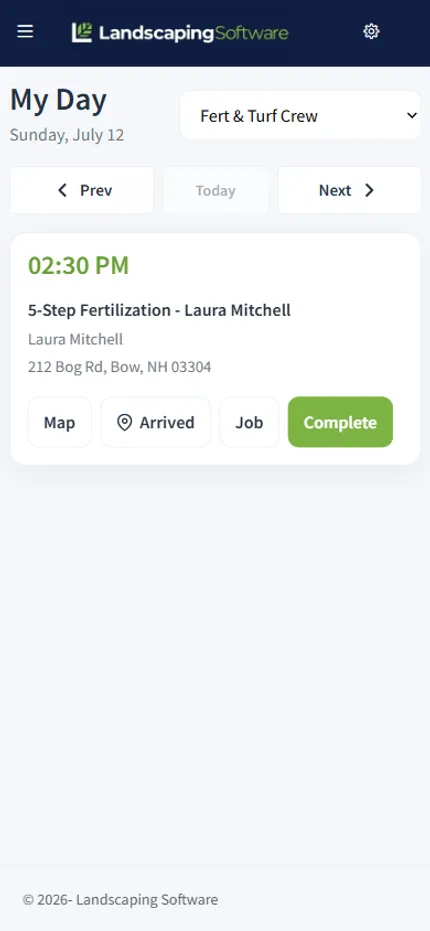
The crew’s day
The stop order saved in the office flows straight to the phone: stop #1, #2, #3, with the property, the customer, and what’s being done at each. A map button navigates to the next stop. No printed route sheets, no morning huddle to explain the day, no calling the office to ask what’s next.
Statuses keep both sides honest: On My Way, In Progress, Completed, Skipped, with a reason when a stop gets skipped. Every change lands on the dispatch board as it happens.
Proof of work
The gap where unbilled visits used to slip through closes here: completion is recorded on site, the office sees what’s done before it bills, and jobs opted into per-visit invoicing generate their invoice the moment the crew hits Complete. A day’s work becomes a day’s billing, not a Friday reconstruction project.
And when the route runs through a dead zone, the app keeps working: captured work queues on the device and syncs when the signal comes back.
Honest scope
The app is deliberately focused on the field workflow: see the day, run the route, and capture the work. Scheduling changes, billing, and management live in the main product where they belong, so the crew’s phone stays simple enough to use with gloves on.
Works together
The stop order you saved in the office is the order crews see in the truck.
Visit completion is what triggers per-visit auto-invoicing.
Log applications from the visit, pre-filled with site, area, and weather.
Storm visits land on crew phones the same way summer stops do.
Questions
Their day: the stops in route order, with the customer, the property, and the work to do. A map button gets them to the next stop; status buttons tell the office where things stand.
The completion wizard walks the crew through it: photos of the work, the checklist for the visit, labor and materials, and a signature when you want one. Completion flows straight back into scheduling and, for jobs opted into per-visit billing, creates the invoice automatically.
Yes, with a reason, and the office sees it immediately. Statuses run On My Way, In Progress, Completed, and Skipped, and they show up on the dispatch board and the appointments grid in real time.
Yes. Captured work is queued on the device and syncs when the connection comes back, which matters on rural routes and in the back corners of commercial properties. As with any offline capture, a healthy habit is syncing before the truck leaves coverage at the end of the day.
No, that’s the point. As crews mark stops complete, the dispatch board and each visit’s status update. The "are you done yet?" phone call retires.
Every plan. The crew mobile app is included on Starter, Pro, and Scale.
14-day free trial · No credit card required