Customers & CRM
A lead pipeline from first call to signed customer, nothing lost in between.
Hardscape & design-build
Patios, walkways, retaining walls, outdoor living. You handle the design. This runs the business around it: the lead, the good/better/best proposal your customer signs online, the deposit that lands before the crew does, and the invoice that gets paid without a phone call.
Honest scope
Let’s be clear about what this is: business-operations software, not a CAD package. There’s no 3D patio renderer, no takeoff tool, no measuring wheel in the cloud. What hardscape contractors actually lose money on is the other side of the job: proposals that sit unsigned, deposits that never get collected, scope disputes with nothing in writing, and invoices that chase the customer for weeks. That’s the side this software runs.
From drawing to deposit to done
The inquiry lands in the pipeline (status, source, notes) with estimates attached to it. Won or lost, you know where every prospect stands.
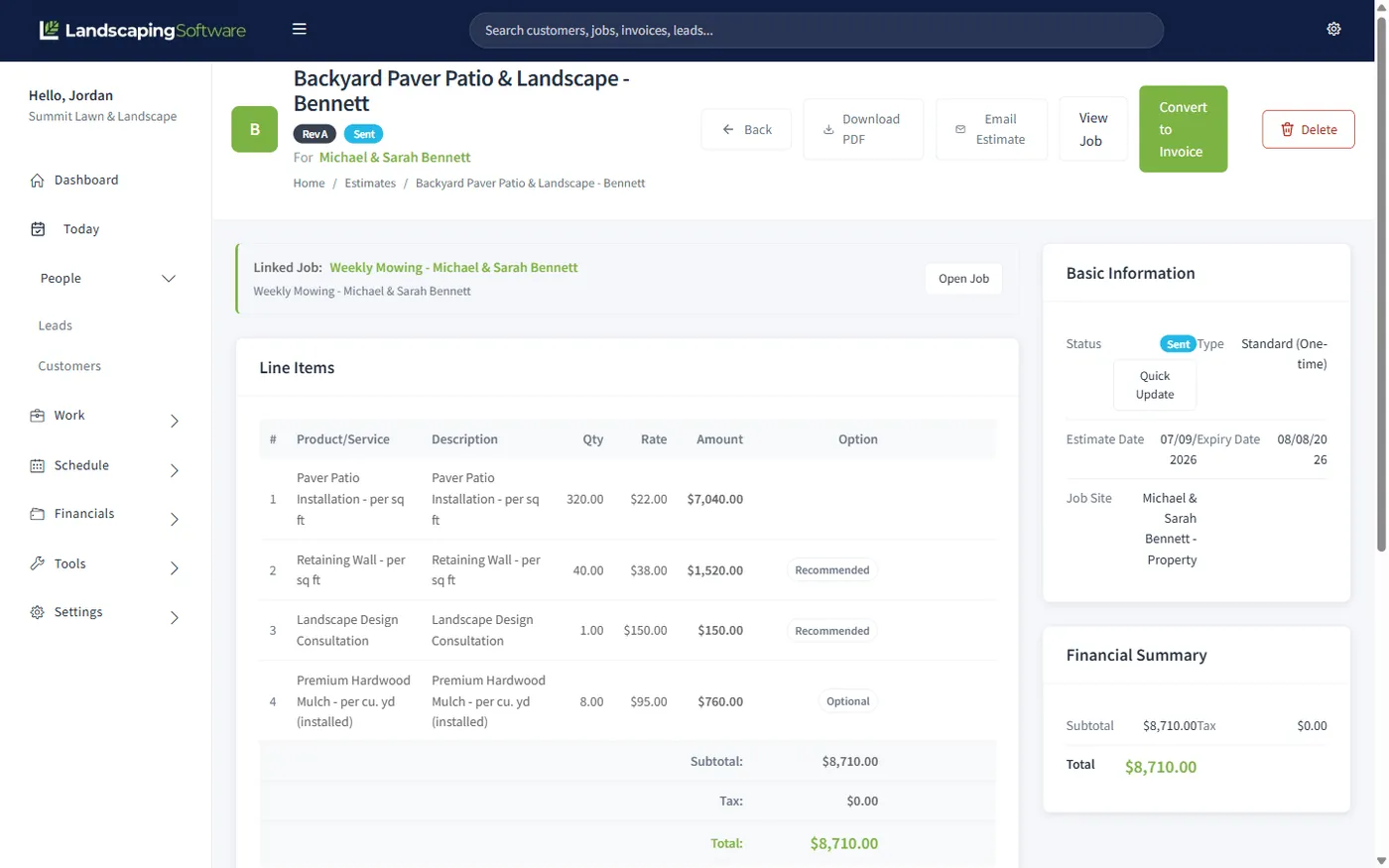
Price the project as line items, then mark the upgrades Recommended or Optional: the premium paver, the fire pit, the lighting package.
In your portal, they tick the options they want, e-sign, and pay the deposit in the same step. A frozen snapshot records exactly what they agreed to.
One click converts the signed proposal to a job: only the accepted lines come across. Put the crew on it and track visits from the field app.
Convert the job to an invoice, apply the deposit on file with one click, and the customer pays the balance online by card or bank.
Good, better, best
A single take-it-or-leave-it number invites haggling. An options proposal invites choosing. Keep the core scope as Required lines, then offer the upgrades as Recommended (pre-checked, so the customer opts out rather than in) or Optional. The proposal they see in the portal is theirs to shape, and every choice moves the total in front of them.
When they sign, the system freezes a snapshot: every line, including the ones they declined, the accepted total next to the proposed one, and the signer’s name, date, and IP address. The estimate locks against edits from that moment: what got signed is what stays on record. Converting to a job copies only the lines they said yes to.
Set deposit terms on the estimate (a percent of the total or a fixed amount) and choose how firm to be: Requested lets the customer accept now and pay down if they like; Required to accept means the signature and the payment happen together, and the acceptance isn’t final until the card clears. Percent deposits track the accepted total, so declined options shrink the deposit automatically.
The money runs through your own Stripe account (we take no platform fee) and the paid deposit sits on file until you apply it to the final invoice with one click, so nobody gets double-billed.
Built for project work
A lead pipeline from first call to signed customer, nothing lost in between.
Proposals approved, deposits paid, invoices settled, under your brand.
Deposits applied automatically, balance paid online, no platform fee.
Put the crew on the project and keep the maintenance routes running.
Stops, statuses, and job photos from the field.
A project-gallery website with lead forms that feed the pipeline.
Projects plus everything else
The patio customer is next year’s maintenance customer if you ask. Because projects and recurring work share one system, the handoff is a job, not a re-key: put them on a mowing or treatment route, run the full-service book, or plow their lot when winter comes.
Questions
No, and we won’t pretend otherwise. There’s no 3D rendering, no takeoffs, no measurements. Keep the design tool you like; this runs everything after the drawing: the lead, the proposal the customer signs, the deposit, the schedule, and the invoice.
Every line on an estimate is Required, Recommended, or Optional. Recommended lines are pre-checked as a gentle upsell; Optional lines are the customer’s call. The customer opens the proposal in the portal, ticks the options they want (the premium paver, the seat wall, the lighting), and e-signs. The system records a frozen snapshot of exactly what they chose and agreed to pay.
Yes. Set the deposit on the estimate as a percent of the total or a fixed amount, and choose Requested (optional for the customer) or Required to accept: with Required, the customer signs and pays in one step, and the acceptance isn’t final until the payment succeeds. Percent deposits are computed from what the customer actually accepted, so if they decline an option, the deposit scales with it.
A signed proposal is locked against edits by design: the record has to match what was signed. If the scope changes, void the acceptance (the signature is removed and the estimate unlocks) and send it back for a fresh signature, or create a new estimate. There’s no separate change-order module; the void-and-re-sign flow is how revisions stay honest.
Convert the signed proposal to a job (only the lines the customer included come across), do the work, then convert to an invoice. The customer’s deposit sits on file and the invoice summary offers a one-click “apply to this invoice,” so they’re only billed the balance. They pay by card or bank in your branded portal, and partial payments are supported. Invoices are line items you build. There’s no formal progress-billing or job-costing module.
Yes, the crew mobile app (included on every plan) gives crews their stops, statuses, and photo capture from the phone. Photos you choose to share appear in the customer’s portal, which is a nice touch on a multi-week build.
14-day free trial · No credit card required