How to Use the Dose Calculator (Chemical Logs)
Last updated July 6, 2026 · Owners, licensed pesticide applicators, and field crews
The Dose Calculator turns a product’s label rate into real-world totals for the area you’re treating: how much product, how much water (carrier), how many tank fills, and how much product goes into each tank. All the unit conversions (fluid ounces to gallons, acres to square feet, and so on) are done for you. Nothing on this page is saved — it’s a scratchpad. To record what was actually applied for compliance, create an application log (the same calculator is built into that form); see Application Logs, the Register, and PDF Reports.
Compliance disclaimer: The calculator does arithmetic from the numbers you give it — it does not know your product’s label restrictions, maximum rates, or site limitations. Always verify results against the actual product label, which is the legal document. This software is not legal or agronomic advice.
Before you start
- An operator account with access to the Work menu.
- The product’s label rate (amount, unit, and the area it covers — e.g. “1.5 fl oz per 1,000 sq ft”).
- Optional but recommended: the product set up in your catalog with its rates, so you can pick it instead of typing — see Set Up Your Chemical Product Catalog.
- Optional, for spray work: the label’s carrier volume (gallons of water per 1,000 sq ft), your tank size, and the mix rate (product per gallon of water) if the label mixes by volume.
Steps
- Go to Work → Dose Calculator in the sidebar.
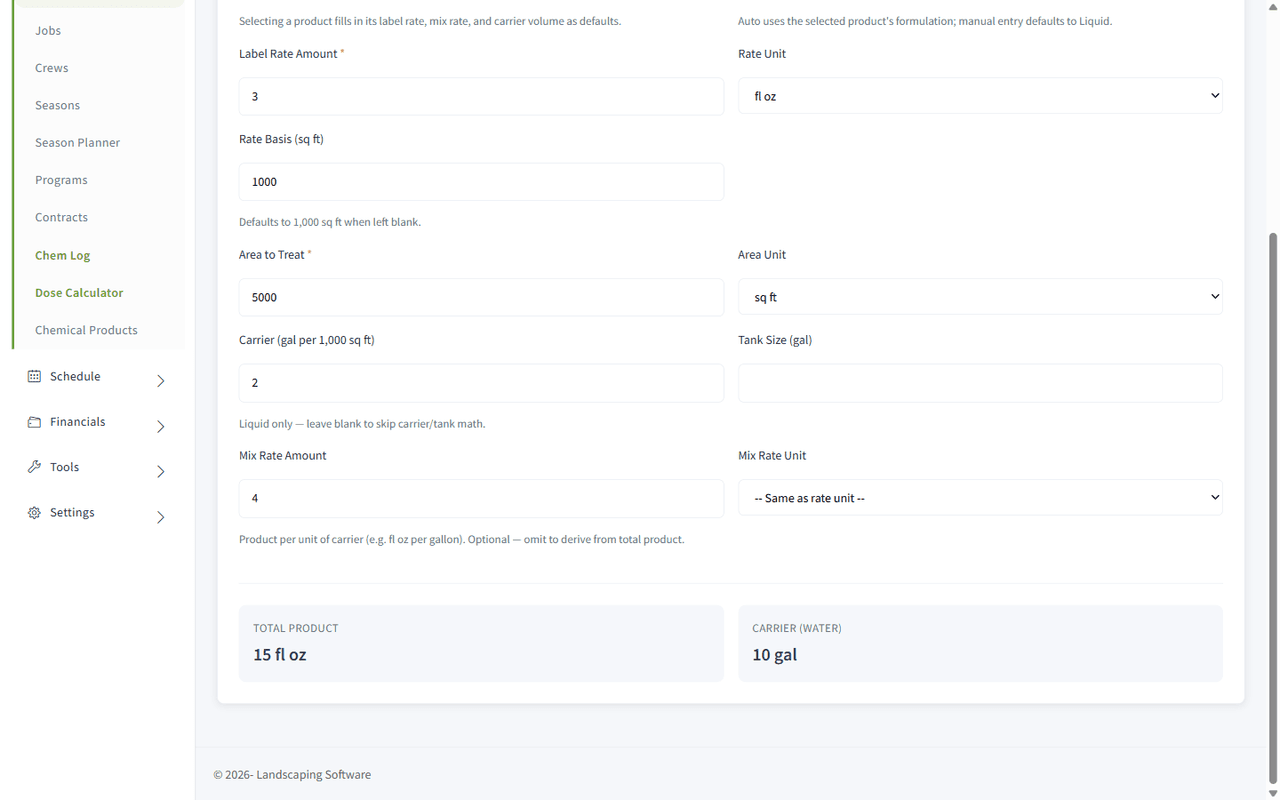
- Pick a Chemical Product from the dropdown — its label rate, mix rate, and carrier volume fill in as defaults, and Formulation switches to match the product. Or leave it on – Manual entry – and type the label values yourself (Formulation on “Auto” is treated as Liquid for manual entry; switch it to Granular for a dry product).
- Enter the Label Rate Amount and pick the Rate Unit (fl oz, dry oz, pt, qt, gal, or lb). Set Rate Basis (sq ft) if the label’s rate isn’t per 1,000 sq ft — it defaults to 1,000 when left blank.
- Enter the Area to Treat and pick the Area Unit: sq ft, 1,000 sq ft, or acre (1 acre = 43,560 sq ft).
- For liquid products, optionally enter Carrier (gal per 1,000 sq ft) to get the water total, and Tank Size (gal) to get the tank breakdown. Add a Mix Rate Amount (product per gallon of carrier, e.g. fl oz per gallon) if the label mixes by volume — leave it blank to have product-per-tank derived from the total instead. The Mix Rate Unit defaults to “– Same as rate unit –”.
- There is no Calculate button. Results appear automatically a moment after you stop typing. If something is wrong, a red error box lists what to fix (e.g. “Area must be greater than zero.”); correct it and the results refresh.
What the results mean
| Result | Shown when | How it’s computed |
|---|---|---|
| Total Product | Always (once rate + area are valid) | Label rate × (area ÷ rate basis). Rounded to 2 decimals. Large amounts auto-convert for readability: 128+ fl oz displays as gallons, 16+ dry oz displays as pounds. |
| Carrier (water) | Liquid formulation with a carrier value | Carrier gal per 1,000 sq ft × (area ÷ 1,000). Rounded to 0.1 gal. |
| Tanks | Liquid, with carrier and tank size | Carrier total ÷ tank size, shown as “N full + X gal partial”. |
| Product per Full Tank | Liquid, with carrier and tank size | Mix rate × tank size when a mix rate is entered; otherwise total product ÷ exact number of tanks. Rounded to 2 decimals. |
What happens next
Nothing is saved — use the numbers to mix and load, then record the actual application afterward. The page header has New log entry (and the guide panel has Log an Application) to jump straight to the log form, which carries this same calculator inside it and can copy its results into the record with one click (Apply to log).
Worked example — liquid spray
A pre-emergent herbicide labeled at 1.5 fl oz per 1,000 sq ft, sprayed in 2 gallons of water per 1,000 sq ft, treating a 15,000 sq ft property with a 25-gallon tank, mixed at 0.75 fl oz per gallon of water:
- Label Rate Amount: 1.5, Rate Unit: fl oz, Rate Basis: 1000
- Area to Treat: 15000, Area Unit: sq ft
- Carrier: 2, Tank Size: 25, Mix Rate: 0.75 fl oz
The calculator shows:
- Total Product: 1.5 × (15,000 ÷ 1,000) = 22.5 fl oz
- Carrier (water): 2 × (15,000 ÷ 1,000) = 30 gal
- Tanks: 30 ÷ 25 = 1 full + 5 gal partial
- Product per Full Tank: 0.75 × 25 = 18.75 fl oz
Treat the same product over 2 acres (87,120 sq ft) and Total Product becomes 1.5 × 87.12 = 130.68 fl oz — which the calculator displays as 1.0209 gal, since totals of 128 fl oz or more are auto-converted to gallons.
Worked example — granular
A granular fertilizer at 3 lb per 1,000 sq ft over 20,000 sq ft (Formulation: Granular):
- Total Product: 3 × (20,000 ÷ 1,000) = 60 lb
For granular products only Total Product is computed — carrier and tank fields are ignored (the hint on the Carrier field says “Liquid only”).
Tips & best practices
- Pick the product instead of typing. Catalog defaults eliminate transcription errors, and the formulation is set automatically.
- Keep liquid and dry units in their families. Rate and mix-rate units must both be liquid (fl oz, pt, qt, gal) or both dry (dry oz, lb) — the calculator will refuse to convert across, with an error like “Cannot convert fluid ounces to pounds — check product formulation”.
- Rate basis matters. A rate of “1.5 fl oz per 1,000 sq ft” and “1.5 fl oz per acre” differ by a factor of 43.56 — double-check the basis printed on the label before trusting the total.
- Use the mix rate when the label gives one. Without it, product-per-tank is derived from the total, which assumes you spray the calibrated carrier volume exactly.
- The calculator inside the log form uses the log’s product and area — you only fill in the rate/carrier/tank details there, and Apply to log copies the results into the record.
Troubleshooting
- No results appear — the two required fields are Label Rate Amount and Area to Treat (marked with red asterisks). Results only render once both are valid positive numbers.
- “Rate amount must be greater than zero.” / “Area must be greater than zero.” — zero and negative values are rejected; enter positive numbers.
- “Cannot convert fluid ounces to pounds — check product formulation” (or similar) — your Mix Rate Unit is in a different unit family than your Rate Unit. Match them (both liquid or both dry), or leave Mix Rate Unit on “– Same as rate unit –”.
- Carrier/Tanks rows don’t show — they only appear for Liquid formulation with a Carrier value entered (Tanks additionally needs Tank Size). If you picked a granular product, that’s expected.
- Total shows in gallons but my measuring cup is in fl oz — totals of 128 fl oz or more are displayed in gallons (and 16+ dry oz in pounds) for readability. Multiply gallons by 128 to get back to fl oz.
- “Unable to reach the server. Please try again.” — the calculation runs on the server; check your connection and re-enter a value to retry.
Related articles
- Chemical Logs Overview — how the calculator fits the catalog → calculate → log workflow
- Set Up Your Chemical Product Catalog — store label/mix/carrier rates so they pre-fill here
- Application Logs, the Register, and PDF Reports — record the application once the work is done